
To produce statements, it is essential that some of the key features are set up correctly to make sure the right data is used.
Before statements can be created, there are a couple of “configuration” steps required. The most important step is attach the correct client identification (ID) number that matches to the client identification number used by the Government.
Each client has an identifying number from My Aged Care. This number is used to match records on the Payment Statement Subsidies file (downloaded from Services Australia Aged Care Online Services portal) with the correct client. The number needs to be stored on the Client record in Turnpoint Care. This is found on the Client Settings screen, shown to the right. Medicare Import Ref is the field.
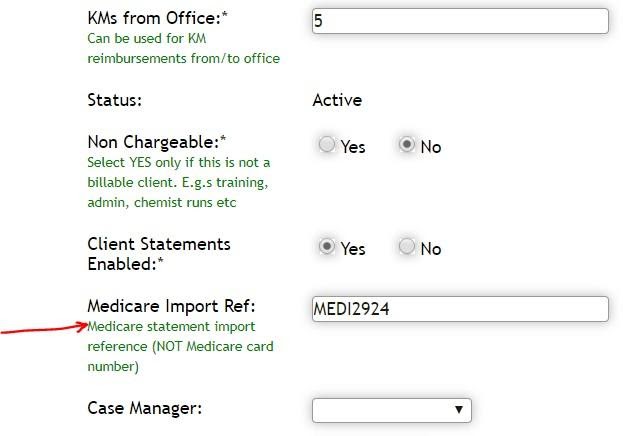
Once you have set this up, you will be set up to start producing statements.
For any further questions, do not hesitate to get in touch: https://www.turnpointcare.com.au/contact-us
Comments
0 comments
Please sign in to leave a comment.