
Estimated Time to Complete: 1hr - 3hrs
Quick Overview:
This article will run you through how to set the standard availability of each of your workers. An employee can also change their availability for specific days through their own log-in.
Steps:
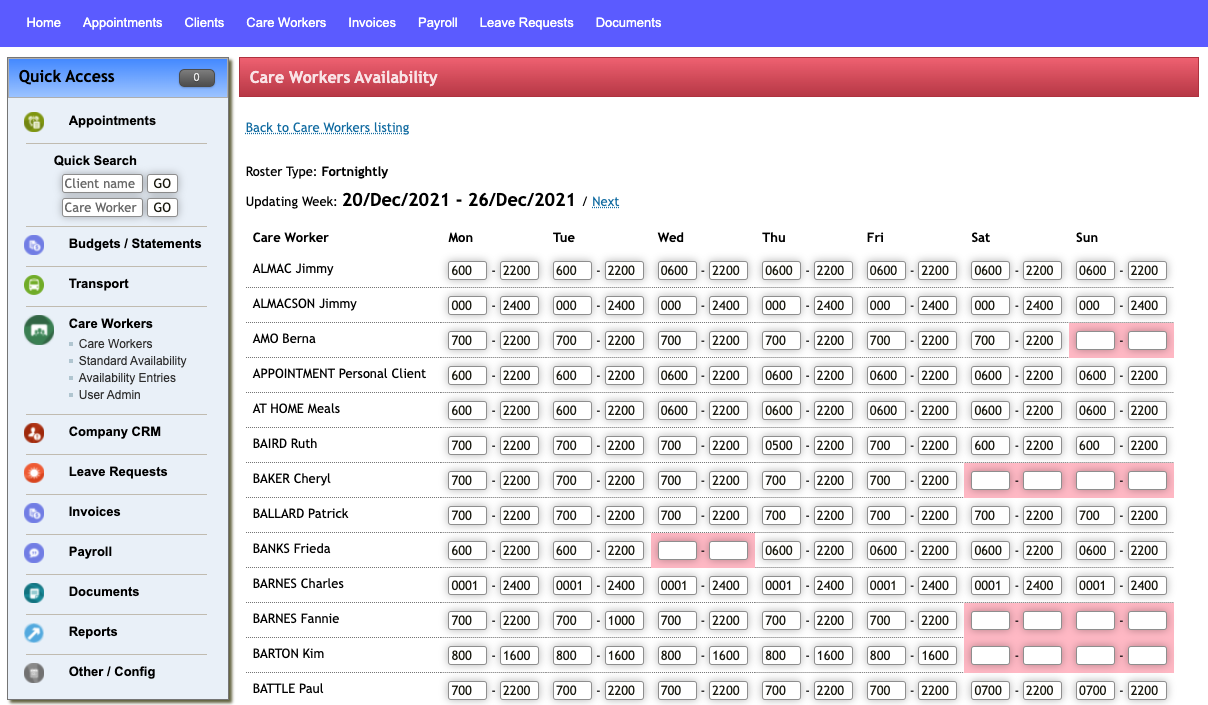
- Select Standard Availability from the left-hand menu this is located under Care Workers
- The current and next week’s view of availability across all carers in the organisation is available. Select Next to see next week’s availability if Roster Type is fortnightly. The Standard availability will repeat based on Roster Type.
- Pink highlighted boxes are periods of unavailability.
-
Availability for carers can be updated directly from this screen. Change the values in the appropriate boxes and select the Update Availability button at the bottom of the form.
-
This function is only available to users with Company Admin access.
Checklist
You have successfully completed this step if you have:
- Identitified regular staff availability
- Assigned regular availability within the TurnPoint system
Comments
0 comments
Please sign in to leave a comment.