
Estimated Time to Complete: 1hr - 3hrs
Quick Overview:
This article will run you through the different access levels as well as how to change these access levels.
Basic User Permissions:
These permissions can be set-up by you as the company Admin and are default out of the box. To Change these permissions follow these steps:
-
Click on “Care Workers” on the top of the screen or under Care Workers on the left-hand-side menu and then click "User Admin"
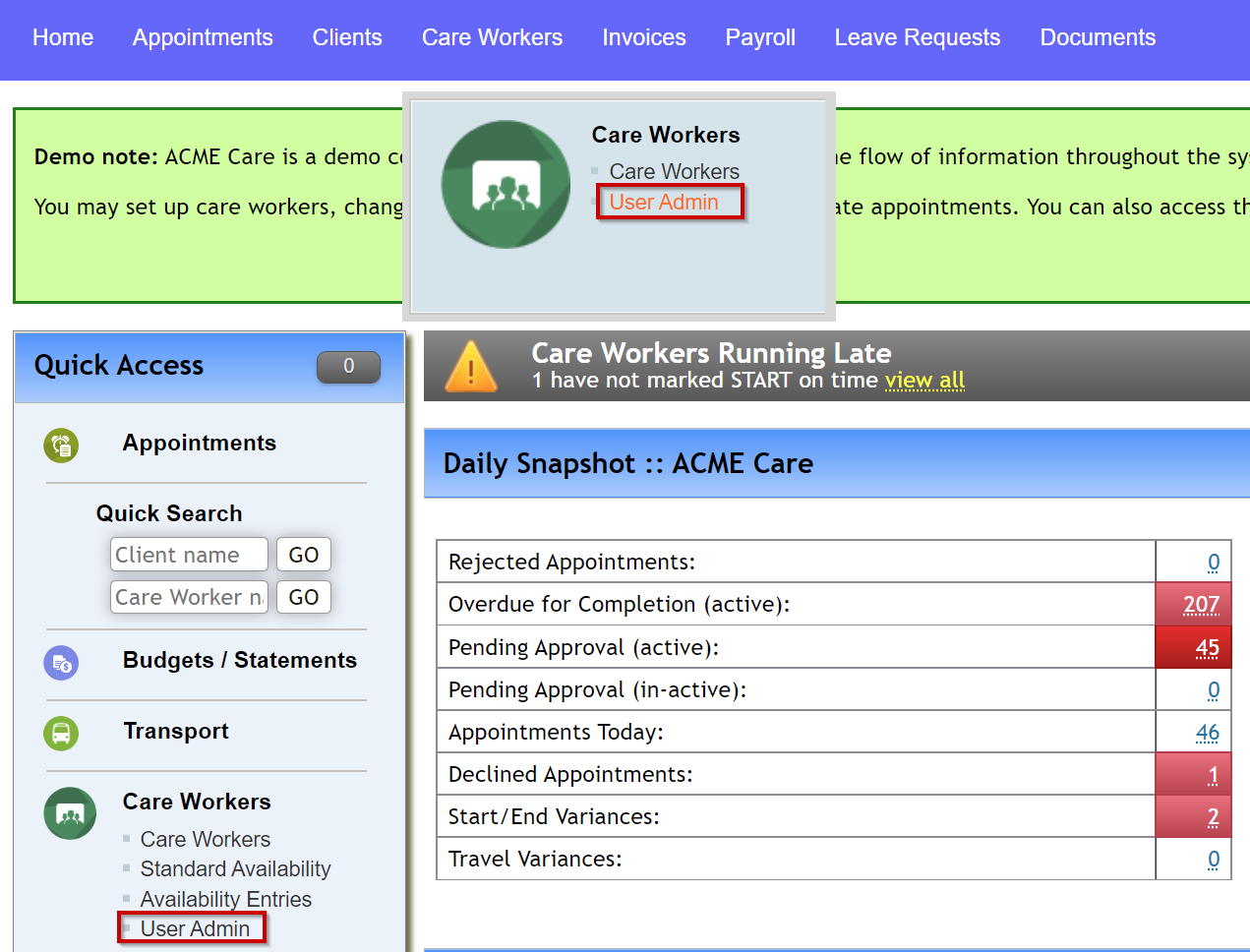
- Click "Update Permissions"

- Change User Level and/or Accounts Access Enabled
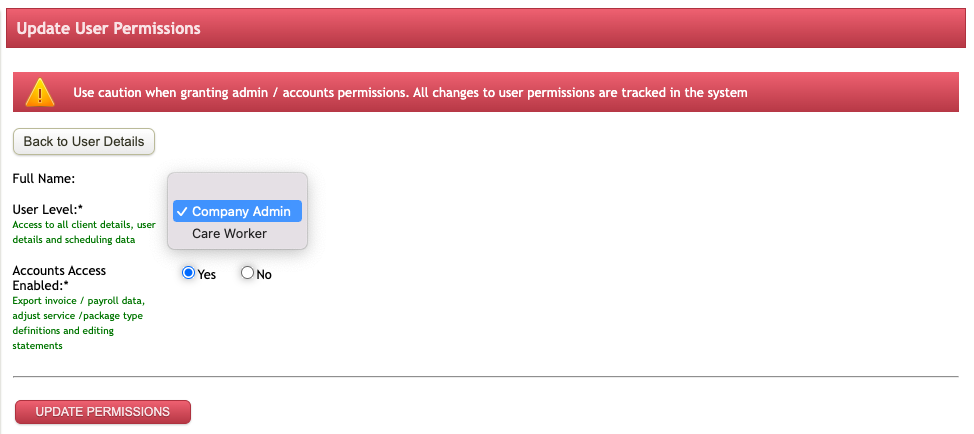
Company Admin staff
- Access to both aggregate & detailed reports, with the ability to drill down to individual care staff & clients.
- Ability to set up new care staff user accounts, with their availability, qualifications, contact details etc
- Ability to set up new company clients, medical notes, repeat appointments and requirements
- Set pay levels & availability for care staff
- Monitor system activity based on clients/time frame/care staff
- Easily identify outstanding issues on the company dashboard
- Define tasks, qualifications, and equipment (consumables/medications) to be tracked
- Schedule, allocate & publish appointments to available care staff
- Approve / reject leave requests
- Approve / reject client referrals
- Generate payroll / invoicing data based on client appointments
Care Staff (Care Worker)
- Access their appointment schedule once published
- Approve/reject individual appointments allocated to them
- Identify outstanding issues such as appointments overdue for completion/approval
- Submit appointment completion time and any relevant notes
- Submit availability for client appointments
- Request leave periods
Accounts Access
Users can have Accounts Access set to either Yes or No, If set to Yes this allows access to Export invoice/payroll data, adjust service /package type definitions and edit statements.
Advanced User Permissions
These are set up behind the scenes and are only accessible by TurnPoint staff. If you wish to implement any of these, please submit a ticket using the link in the top right of this page "Submit a request"
Restricted Leave Approver Option
Company Admin users can now be restricted from approving leave requests entered in the system. Only listed users will be able to action leave requests. Please submit a support ticket to enable
User Record Locking Option
Company Admin users can now be restricted from viewing and editing user records. Only listed users will be able to view and edit user records. Those with restricted access will still be able to schedule and allocate appointments to care workers and view and edit client details. Please submit a support ticket to enable
Appointment/Weekly Planner Locking Option
Company Admin users can now be restricted from creating and editing appointments including adjusting appointments within the weekly planner. Those with restricted access can still view the appointment & weekly planner, care worker details and client details. Please submit a support ticket to enable it.
Checklist
You have successfully completed this step if you have:
- Read through the available information in this article
- Identified what user restrictions you would like in your system
- Adjusted your workers with the Basic Restrictions
- Contacted the TurnPoint support team using the "Submit Request" button for advanced restrictions
Next Article: 6.3 - Care Workers - Standard Availability
Comments
0 comments
Please sign in to leave a comment.