
- Overview
- What happens if I don't submit the QFR?
- Completing the QFR
- Part 4: Home care labour costs and hours reporting
Overview
Approved providers of aged care are now required to submit the new Quarterly Financial Report (QFR). The QFR is submitted via the Forms Administration QFR portal.
The Forms Administration QFR portal will open for quarter 1 submissions from 1 October 2022, with submissions due on 4 November 2022.
The QFR must be submitted 4 times throughout the financial year. Legislated submission dates for 2022/23 financial year are as followed:
- Quarter 1: Report due 4 November 2022 (reporting period 1 July 2022 - 30 September 2022)
- Quarter 2: report due 15 February 2023 (reporting period 1 October 2022 - 31 December 2022)
- Quarter 3: report due 5 May 2023 (reporting period 1 January 2023 - 31 March 2023)
- Quarter 4: report due 4 August 2023 (reporting period 1 April 2023 - 30 June 2023)
The QFR reporting template is divided into five parts:
- Part 1: Viability and prudential compliance questions
- Part 2: Quarterly Financial Statements
- Part 3: Residential care labour costs and hours reporting
- Part 4: Home care labour cost and hours reporting
- Part 5: Quarterly Food and Nutrition report
Part 1, Part 2 and Part 4 of the QFR will apply to those TurnPoint users who deliver services to clients under the Home Car Package programme, the Commonwealth Home Support Programme or Short-Term Restorative Care programme.
The Quarterly Financial Report does not need to be audited. However, legislative requirements (commencing 7 September 2022) similar to the ACFR include:
- The QFR must be signed by: a director of the body corporate (if the provider is a body corporate that is incorporated under the Corporations Act 2001);
- Or a member of the provider's governing body (in any other case). For government providers, the QFR must be signed by one of the approved provider's key personnel who is authorised by the approved provider to sign the report.
The QFR template and definitions can be downloaded from the Forms Administration data collection portal using the link below. Providers will be notified via email once the portal opens. The Forms Administration help desk is available to assist with the completion and submission of the QFR. Providers can call the helpdesk on (02) 4403 0640 or email enquiries to health@formsadministration.com.au
https://health.formsadministration.com.au/DSS.nsf/DSSForms.xsp#QFR2022
What happens if I don't submit the QFR?
Providers have responsibilities under the Aged Care Act 1997 (Cth) and associated Principles to report certain information to the department and the Commission.
This includes providing statements on financial and prudential matters, submitting data required under the Quality Indicator Program and making reports under the Serious Incident Response Scheme.
Where a providers fails to meet its reporting obligations, the Commission will consider a range of escalating regulatory actions. Depending on the nature and extent of the non-compliance, this may involve engaging with a provider via telephone/email, issuing a notice requiring the production of information, or taking enforceable regulatory action.
TurnPoint strongly suggests that providers complete the QFR, and submit by the 4 November 2022 deadline.
Completing the QFR
As stated in the Overview, four parts of the QFR apply to TurnPoint providers who deliver car under Home Care Package programme, the Commonwealth Home Support Programme or Short-Term Restorative Care programme.
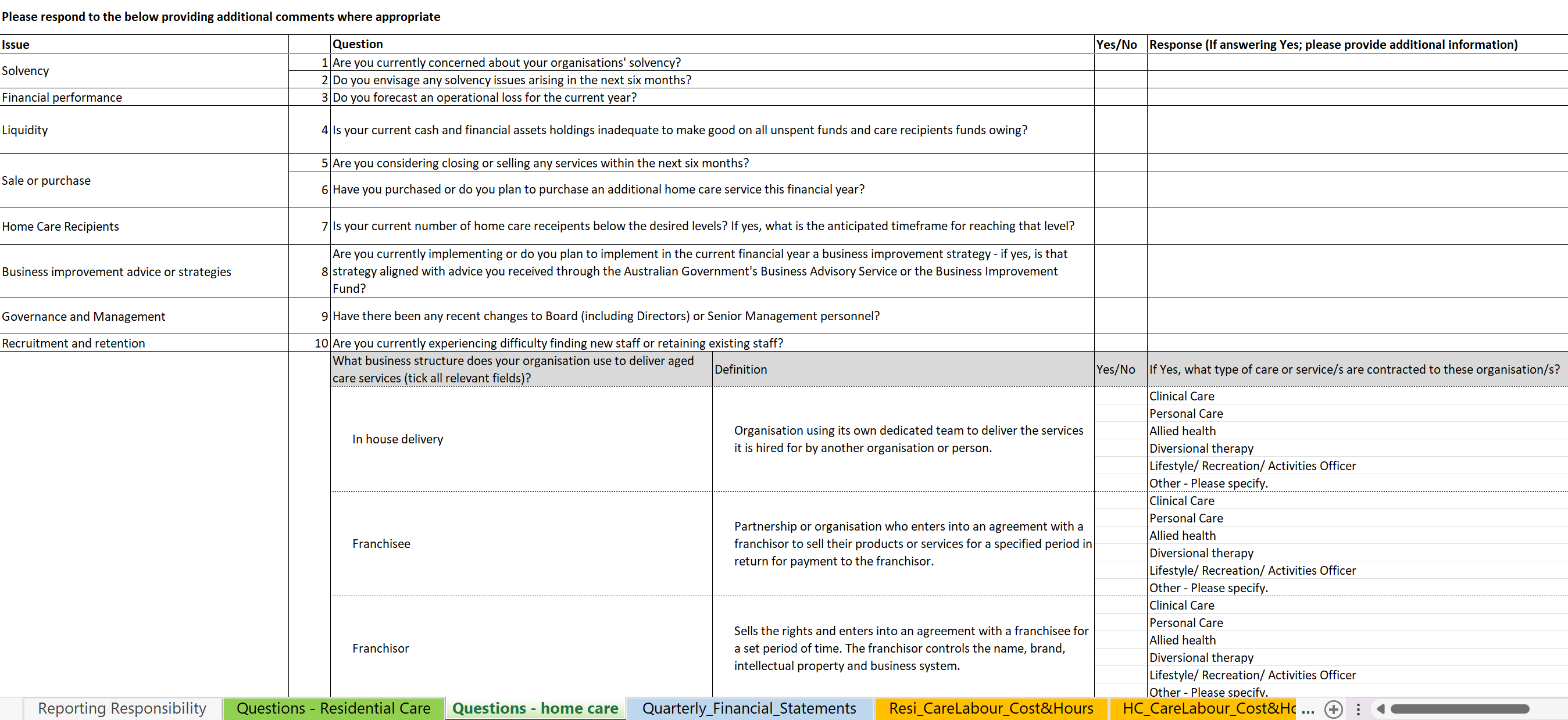
Part 1: Viability and prudential compliance questions
There are eleven questions within this section of the QFR, all of which are qualitative in nature.
No information from the TurnPoint system will be necessary to complete this part of the QFR.
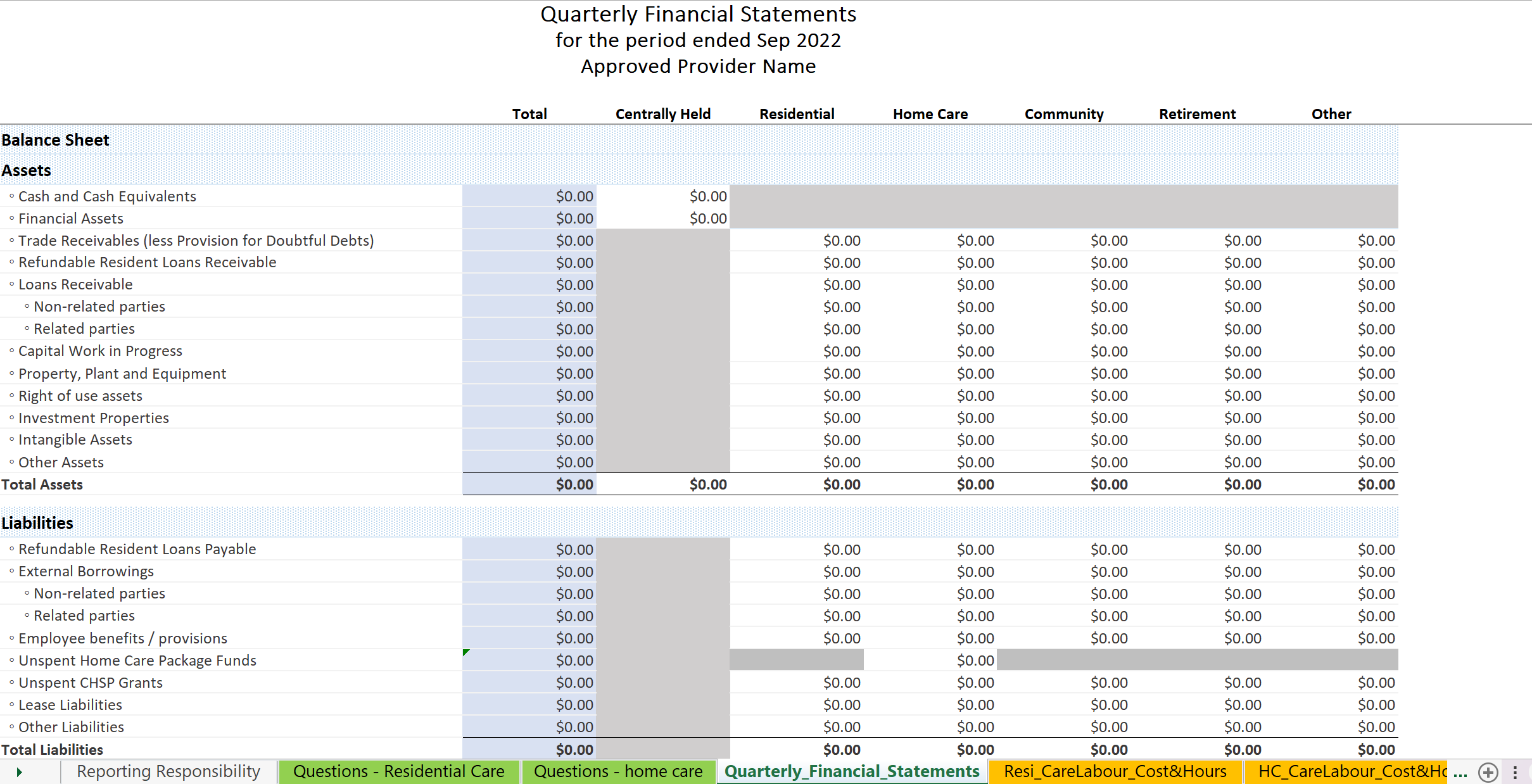
Part 2: Quarterly Financial Statements
In order to complete part 2 of the QFR you are required to input information directly from your accounting system, with specific reference to your Balance Sheet and Income & Expenditure Statement.
This part of the QFR asks that you divide your financial information into segments, breaking out your Balance Sheet and Income & Expenditure Statement into organisation segments.
No information from the TurnPoint system will be necessary to complete this part of the QFR.
Part 4: Home care labour costs and hours reporting
This section of the QFR is divided into two sections
Section 1: Care Expenses
You are required to provide information regarding the cost of particular team members, dependent on their classification.
The information required to complete section 1 must be broken down by Aged Care Planning Region. Information regarding the 73 Aged Care Planning Regions can be accessed using the below link:
https://www.gen-agedcaredata.gov.au/Resources/Access-data/2018/May/Aged-Care-Planning-Region-Maps
The information required to complete section 1 will likely be sourced from your accounting and/or payroll system.
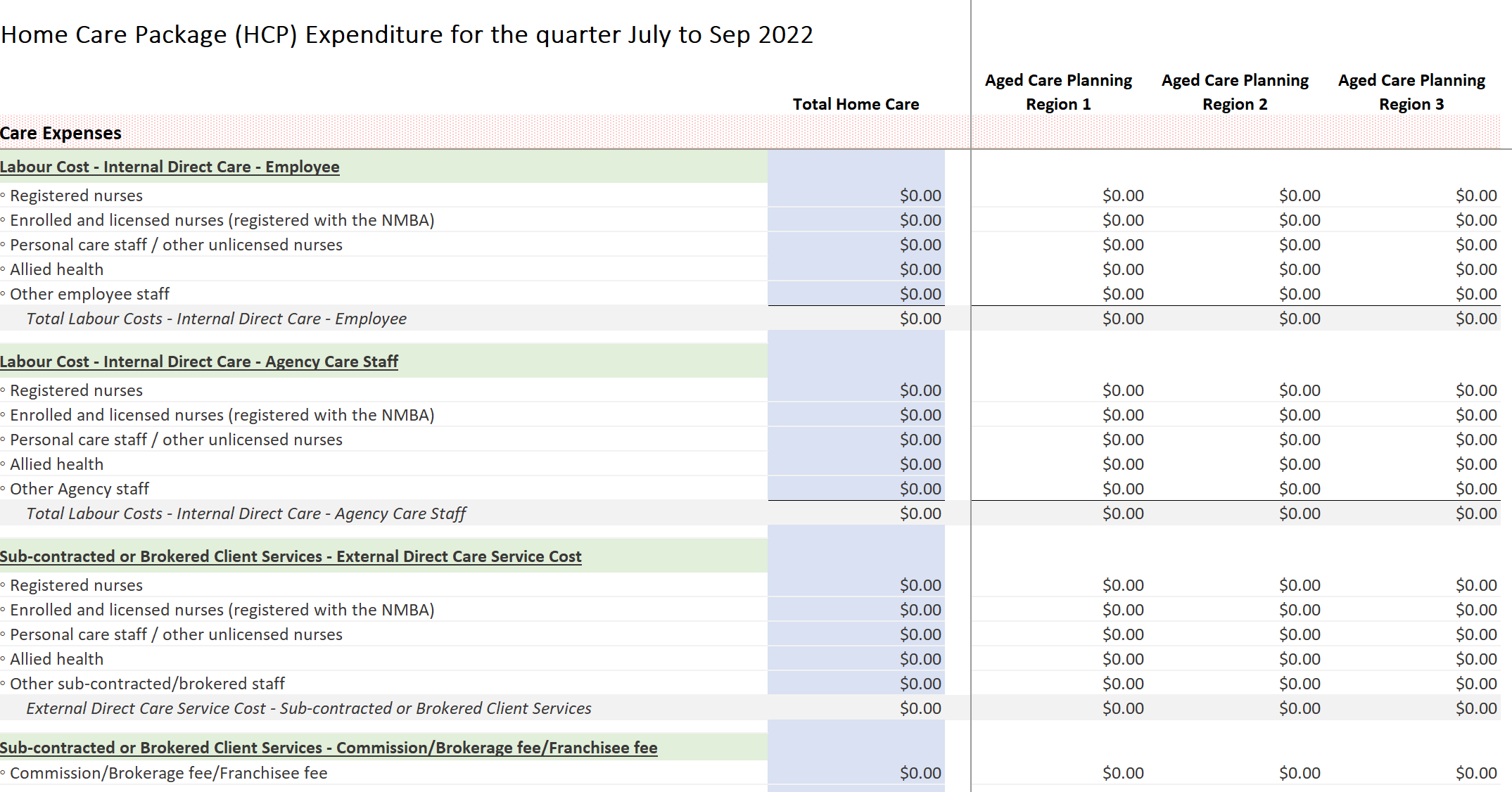
You are also required to provide information about the average rates of pay that are paid to team members, dependent on their employment classification. Again, this information will likely be sourced from your accounting and/or payroll system.
Section 2: Care Hours
You are required to provide a breakdown of the hours that your team members spend working on particular tasks. You are also required to provide a breakdown of the hours that team members spend working on both care management and administrative support.
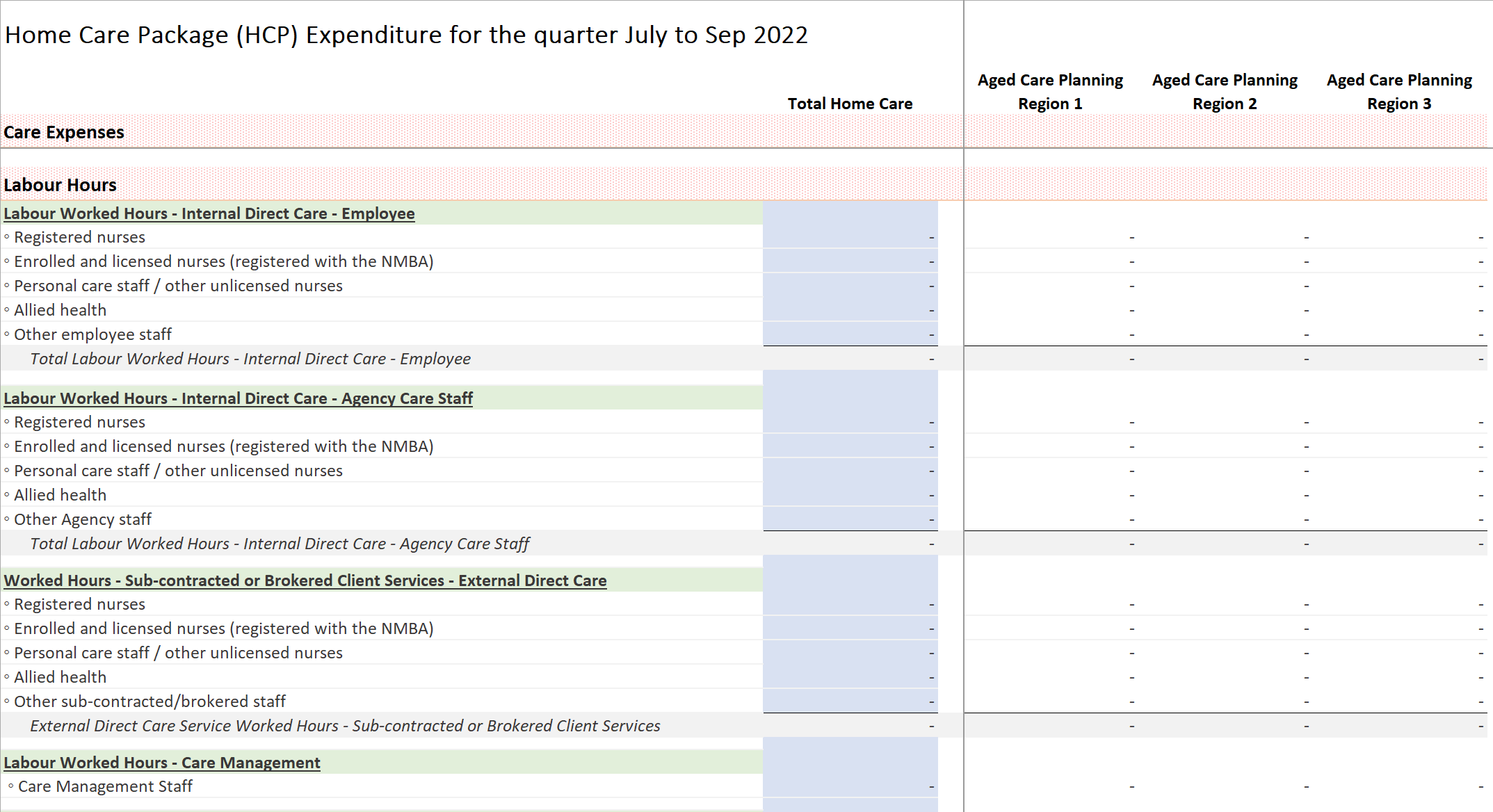
TurnPoint is able to provide service level data to assist with the completion of this section of the QFR.
TurnPoint has built a new feature, linking a client with their relevant planning region. The ACPR assigned to a client is dependent on the postcode entered when creating a client record in TurnPoint.

Note: we have batch updated all existing clients up until 1 October 2022, we strongly recommend reviewing allocation prior to submission due date. Clients added to TurnPoint after 1 October 2022 will need the planning region allocated.
The ACPR data field can be accessed by clicking Edit Settings within a client record. It is the last data field within the client record.
We have created two options with accessing these reporting hours. The overview report is automatically calculated based on Client's regions and the Care Worker's team allocation, it cannot be edited within the screen and unable to access the details on the hours within the report. The detailed report allows you to export all the hours into excel which will allow you to reallocate teams if required.
Option 1: Overview Report
To run an overview report on ACPR level hourly data, please use the QFR Hours within Grouped Summary reporting feature.

When running this report, ensure that the dates are updated to the relevant quarterly period and applicable packages are selected
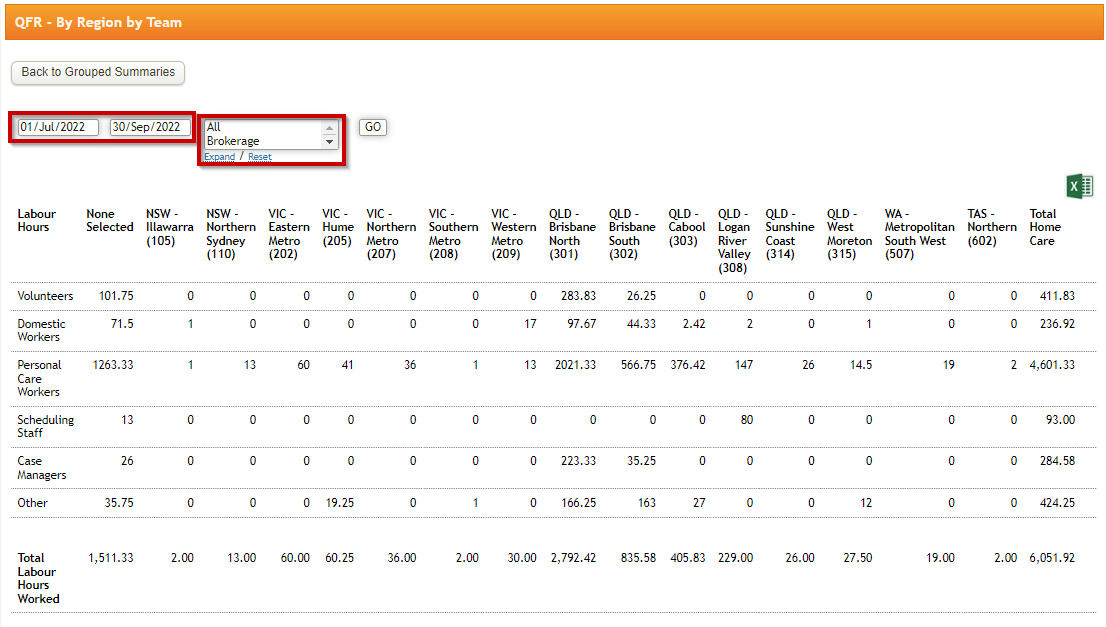
Note: The labour hours are based on Team allocated to Care Worker's profile.
Option 2: Detailed Report
To run a detailed report on ACPR level hourly data, please use the By Appointment - Custom within Mail Merge reporting feature.
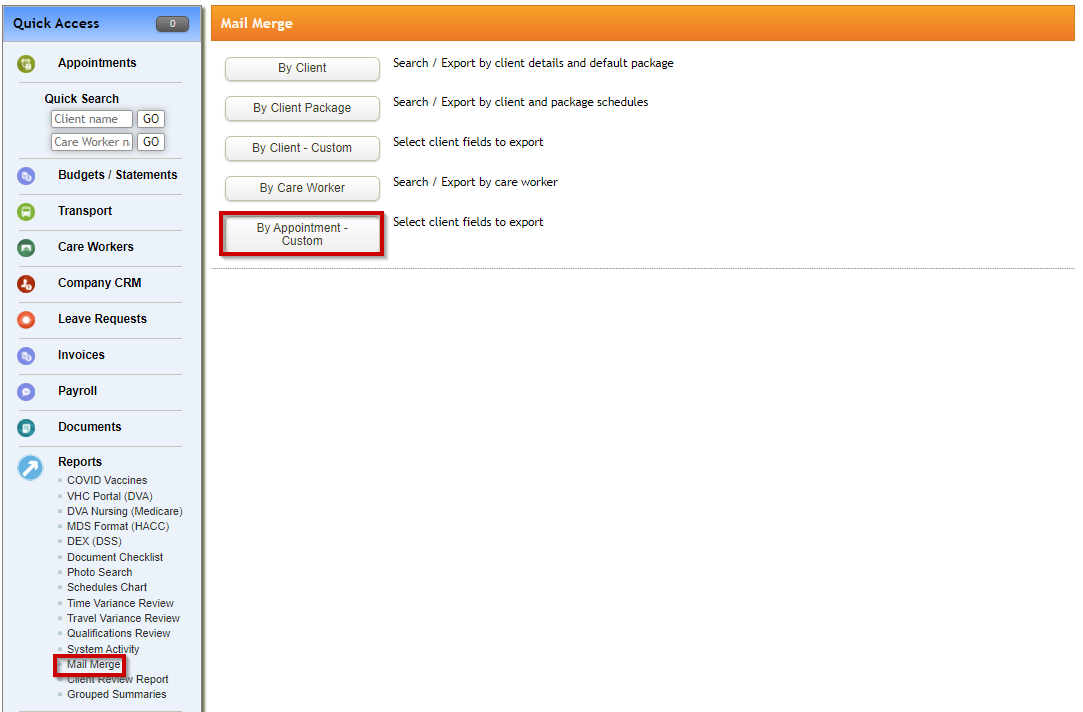
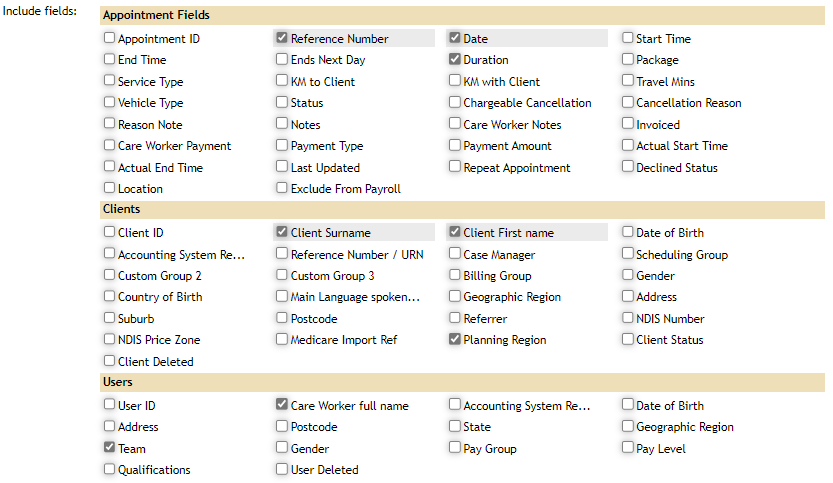
When running this report, ensure that the below fields are selected:
- APPOINTMENT FIELDS
- Reference Number
- Date
- Duration
- CLIENTS
- Client Surname
- Client First Name
- Planning Region
- USERS
- Care Worker Full Name
- Team (if relevant)
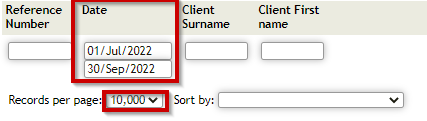
Please ensure that the relevant quarter dates are entered into the FROM and TO fields i.e. 01/07/2022 and 30/09/2022
As this report is likely to be significant in size, it is also suggested that you change TurnPoint to show 10,000 records per page. This will ensure that all relevant data is captured within the report.
The size of this report means that is may take TurnPoint some time to run this report. Your browser should reflect that the system is loading the report once you have selected Search
Once the system has generated your report, it will be available for download.
The report will provide an eight column .xls report (excel), allowing you to manually manipulate the data in order to complete the relevant QFR report input fields.
Please note that the duration data is provided in minutes and will need to be divided by 60 to convert into hourly. The QFR report requires hourly units.

In order to define the QFR input fields required, you will need to tag each team member to the categories provided within the QFR template. You will also need to sort the data by the Planning Region field, to ensure that it is broken down into the correct reporting segments.
Alternatively, TurnPoint does have a feature to enrol users into Teams. Providers may wish to use this feature and align users into Teams that are consistent with the categories provided within the QFR template.
To view more on teams please view this article.
Comments
0 comments
Please sign in to leave a comment.