
To simplify navigation of the TurnPoint system, we have created a side panel to provide you with access to the tools you need to update the planner.
Control over updates to the weekly planner is facilitated by a number of vertical tabs in the side panel. The default view for a schedule update in progress as seen on the right.
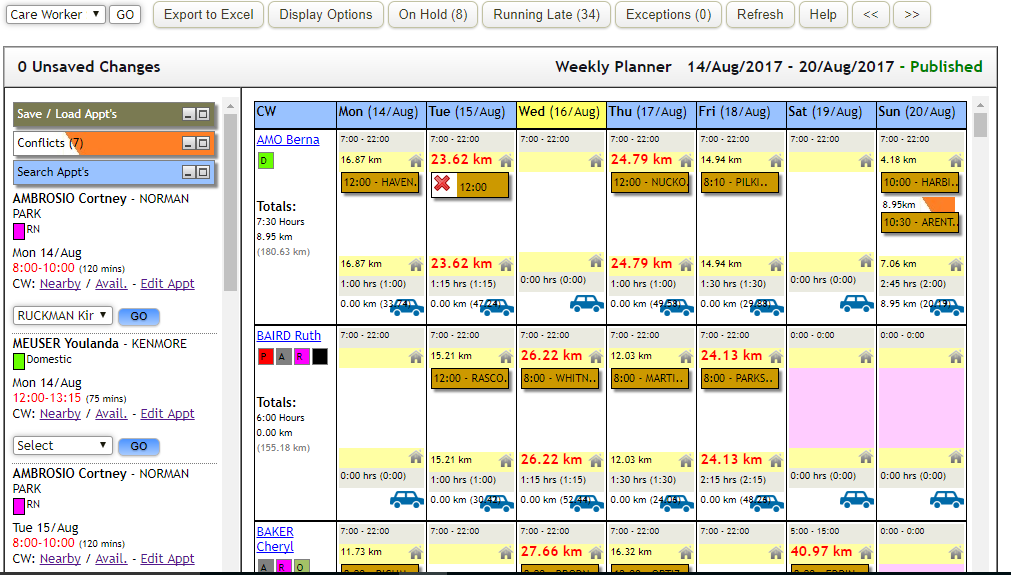
Appointments yet to be allocated to a support worker are listed under the tabs. To resolve these appointments, selections can be made directly from the care worker drop down then select GO. Workers in the list highlighted in pink are unavailable at the time. Those highlighted in orange do not have the requisite qualifications.
Alternatively, targeted lists of care workers who are nearby (“Nearby” link) and/or available at that time (“Avail.” Link) are available. Should it be necessary to edit the appointment, to change the times or other aspects a link “Edit Appt” is available.
Selecting “Nearby” in the side panel opens a list on the left showing support workers, the distance they will have to travel to get to the appointment, available time and their allocated hours that day already. If the “allocated hours” is pink then the support worker already has an overlapping appointment. They are included in case there is a preferable, more efficient option to move an appointment to accommodate this new one.
Selecting “Avail.” changes the main view to show all support workers and their availability on an expanded daily view. The travel distance is shown. There are a number of options to adjust the view, showing all care workers, qualified only, times rather than distance.
For any further questions, do not hesitate to get in touch: https://www.turnpointcare.com.au/contact-us
Comments
0 comments
Please sign in to leave a comment.