
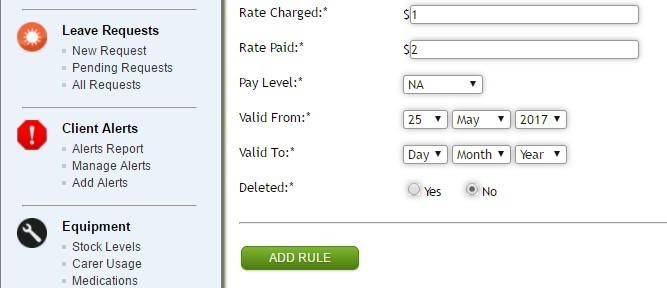
Available from the Service Billing Rules screen. Make changes and commit them by selecting the Add Rule button at the bottom of the form.
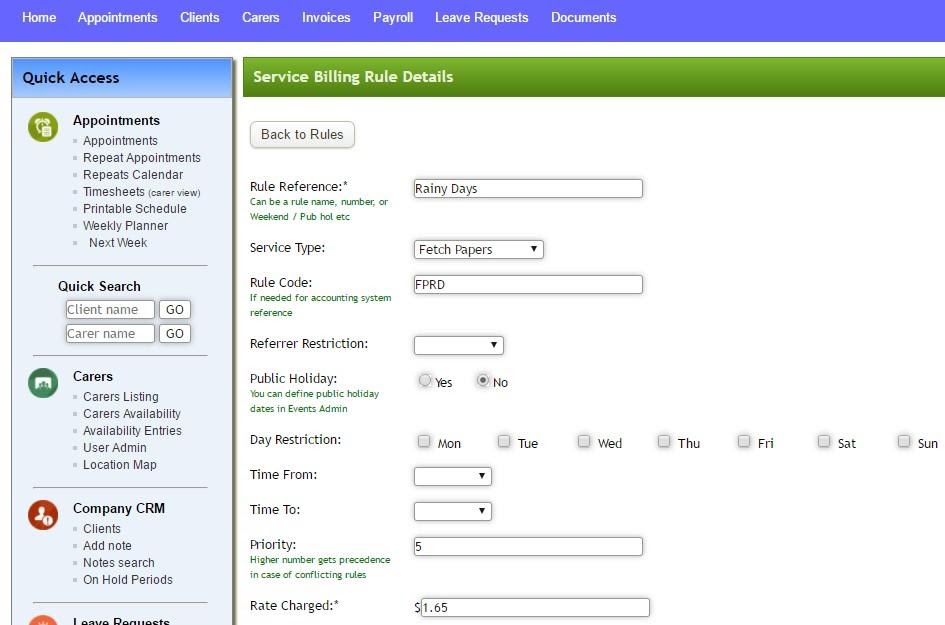
- Rule Reference is a descriptive term for a rule.
- Service Type will indicate which Service Type this rule is to apply to. Left blank the rule will apply to all Service Types.
- Rule Code is an equivalent field to Rule Reference and is used internally in the system and for file exports to external systems such as accounting packages.
- Referrer Restriction allows for a rule to be restricted to clients from a specified referrer.
- Public Holiday can be set to indicate whether or not a rule is applicable on public holidays or not. A separate register of public holidays is kept in the system and can be found under Events Admin.
- Day Restriction gives the days of the week on which a rule will apply.
- Time From shows a starting time of day for when a rule applies.
- Time To shows a finishing time of day for when a rule applies.
- Priority is the priority order to be used when calculating a service charge. Higher priority numbers have precedent and will be applied first in the situation where 2 differing rules might apply. Rules are not cumulative.
- Rate Charged is the applicable rate to charge clients, either hourly or fixed.
- Rate Paid is the applicable pay rate for staff if there is no Pay Level specified. It can be either hourly, fixed.
- Pay Level refers to the pay rate to apply. This is an override to a care workers normal pay level.
- Valid From indicates the start of the period in which a rule applies.
- Valid To indicates the finish of the period in which a rule applies.
- Deleted is used to turn a rule inactive.
For any further questions, do not hesitate to get in touch: https://www.turnpointcare.com.au/contact-us
Comments
0 comments
Please sign in to leave a comment.