
We have now introduced NDIS rate overrides per Service Types, giving you the ability to avoid manual calculations or needing to generate manual invoices outside of TurnPoint.
This can be updated for existing Service Types.
To create a new Service Type with an Override NDIS Rate:
Follow the steps in Adding Service types
Within Rate Override section enter:
{Weekday Daytime:0}
{Weekday Evening:0}
{Weekday Night:0}
{Saturday:0}
{Sunday:0}
{Public Holiday:0}
Adding the override amount after instead of '0'
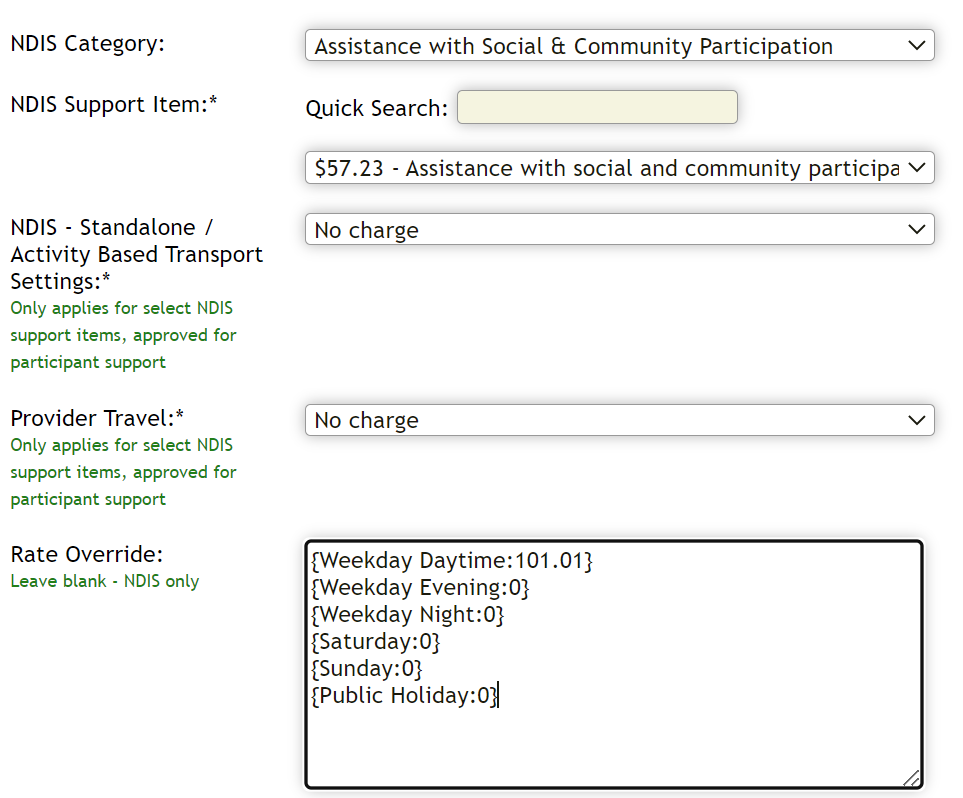
Once happy with Service Type, select Add Service
To update an existing Service Type with an Override NDIS Rate:
Follow the steps in Edit Service Types
Within Rate Override section enter:
{Weekday Daytime:0}
{Weekday Evening:0}
{Weekday Night:0}
{Saturday:0}
{Sunday:0}
{Public Holiday:0}
Adding the override amount after instead of '0'
Once happy with Service Type, select Update Service
It will not automatically override repeats/appointments already in place. To apply to a current repeat/appointment you will need to open and toggle the service type, then save.
Comments
0 comments
Please sign in to leave a comment.