
The TurnPoint dashboard contains a location map to show you in an easily accessible window where your care workers are working today
The location map can be found on the Home page.
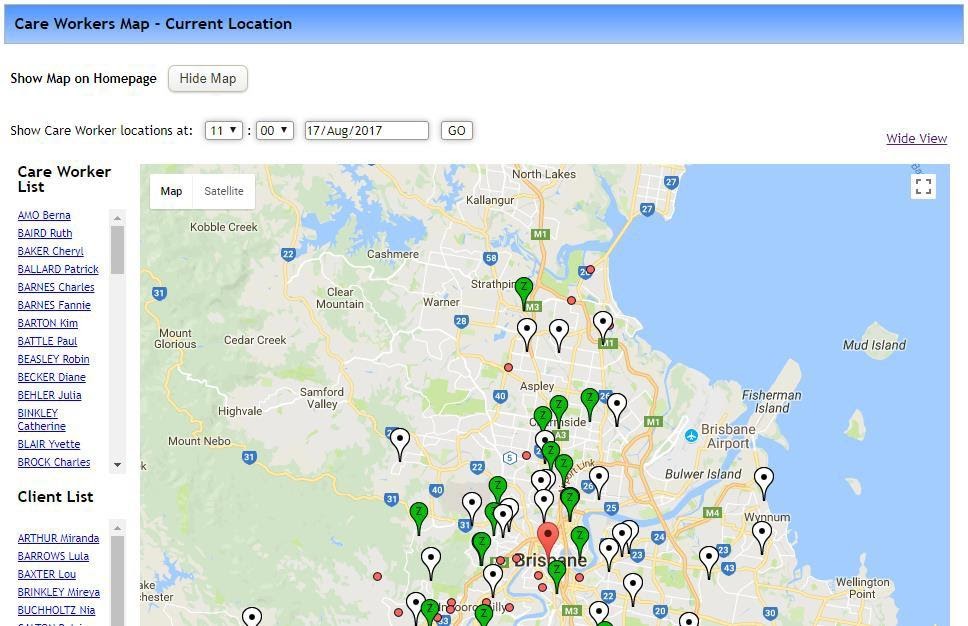
It shows both care workers, shown as tags, and clients shown as round dots.
Selecting a care worker’s name or client’s name from the lists at the left will cause their tag or dot to bounce.
The location, colour, etc of the tags are driven by the schedule for the day so it is possible to see where a care worker is meant to be at a particular time of the day by setting the time and day then selecting Go.
A red tag is an on duty care worker. A green tag is an off duty care worker. A white tag is a care worker on leave. A red dot is an appointment.
For any further questions, do not hesitate to get in touch: https://www.turnpointcare.com.au/contact-us
Comments
0 comments
Please sign in to leave a comment.